Connecting internet TV to your television
to read 6 хв
What is internet TV and why do you need it?
A Smart TV box is a compact device that runs on an operating system and provides internet access for your television. It’s a solution for owners of TVs without built-in SMART features who want:
- access to hundreds of TV channels via internet TV;
- the ability to watch movies and series from online cinemas;
- access to YouTube and other video services;
- the ability to install various apps and games.
Types of internet TV boxes
There are several types of TV boxes on the market, differing in features and operating systems:
- Android TV boxes – the most popular option, offering easy control and a vast selection of apps for watching TV channels. These devices provide access to the Google Play Store and all Google services.
- Stick devices – compact devices resembling a flash drive that connect directly to the TV’s HDMI port. Ideal for those who value minimalism and mobility but want full internet TV functionality.
- Windows boxes – high-performance devices that are essentially mini-computers. They offer the broadest functionality but are more expensive than other types.
- iOS boxes – Apple devices that integrate with other Apple products. Note that most content in the Apple ecosystem is paid.
- Smart TV boxes – versatile devices with extended functionality for streaming internet TV and using various media services
- Google TV boxes – models with built-in Google services, allowing seamless synchronization with other devices and platforms.
How to choose a set-top box for digital TV
To select the right box for digital TV, consider all relevant factors.
What to look for when buying a digital TV box
When choosing a Smart TV box for digital television, pay attention to the following features:
1.Operating system
- Android – the most popular OS with many available apps;
- Windows – a powerful system with extensive features;
- Linux – a cost-effective system for basic functions.
2.Built-in storage
- Android – at least 32 GB;
- Windows – 12-14 GB;
- Linux – 8 GB.
Affects the comfort of watching TV channels and storing applications. For comfortable use, it is recommended to choose at least 8 GB – the more, the better.
3.RAM (Memory)
- Android – at least 4 GB;
- Windows – at least 3 GB;
- Linux – at least 2 GB.
Affects device speed and application launch times. Although the list includes minimum values, we recommend considering options of 4 GB and above.
4.Bluetooth
Recommended version 4.0 or higher to connect additional devices.
5.Wi-Fi
We recommend using a router with a minimum of 2.4 GHz, but for optimal image quality, it should also support 5 and 6 GHz technologies.
6.Image quality
Choose devices with Full HD or 4K support for the best TV viewing experience.
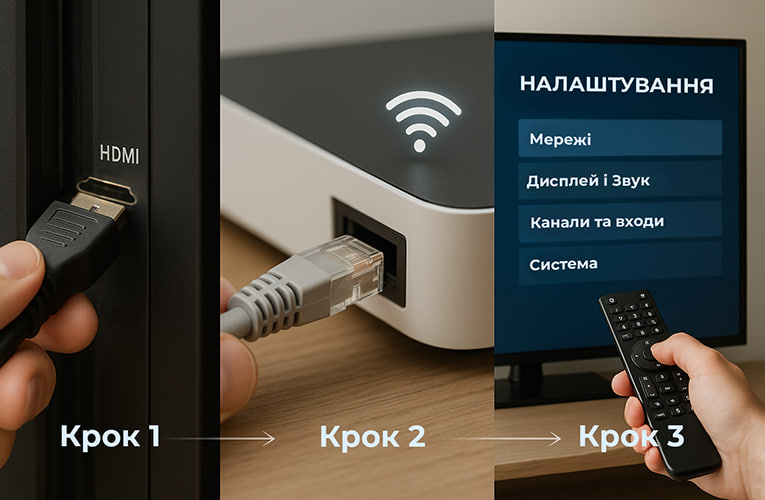
How to properly connect TV via the internet
Learn how to connect your TV to the internet and enjoy your favorite shows in Full HD.
- Preparing the equipment:
- Ensure you have an HDMI cable and internet access.
- Check that your internet plan offers sufficient speed for streaming TV channels.
- Physical connection:
- Connect the set-top box to your TV using the HDMI cable.
- Connect the box to the internet (via cable or Wi-Fi).
- Plug the box into a power source.
- OTT settings:
- turn on the TV and select the appropriate signal source (HDMI);
- follow the setup instructions on the display;
- install the official app of your digital TV provider (e.g., BRIZ.TV), which isrequired to watch Internet TV;
- log in using the provided username and password;
- enjoy watching your favorite TV channels.
Common issues when connecting a smart set-top box
Let’s go over what might go wrong and how to fix it.
Why isn’t internet TV working?
-
No image on the TV screen:
- Check if the box is powered on (indicator light should be on).
- Make sure all cables are connected correctly.
- Switch the TV to the correct input mode using SOURCE, AV, or INPUT buttons on the remote.
-
Not all TV channels are available:
- Ensure the correct digital TV package is activated.
- Check your internet connection quality.
- Update the box’s software and apps.
-
TV channels are glitchy or lagging:
- Check internet speed (at least 100 Mbps for HD quality).
- Make sure other devices aren’t overloading your network.
- Place the box closer to the Wi-Fi router or use a wired connection.
Advantages of watching TV channels online
Internet TV offers several benefits over traditional television:
- A wide variety of content – hundreds of channels for every taste.
- Show archives – rewatch programs that already aired.
- No cables or antennas – a compact, tidy solution.
You can choose and order a Smart TV box for watching TV channels on our website in the "Equipment" section or by contacting our consultants.
Receive information about promotions and news from BRIZ to your email address

Be the first to comment