How to find out the login and password for connecting to the internet (PPPoE)
to read 6 хв
- How not to get confused by passwords?
- Wi-Fi network password
- Login and password to access the router
- Login and password for connecting to the internet (PPPoE)
- What is PPPoE and why authorization is needed
- How to find out the login and password for internet setup
- How to connect and quickly restore the internet
How not to get confused by passwords?
Imagine the situation: you are renting an apartment, Wi-Fi connects, but the internet does not work.
Internet from the BRIZ provider is already connected. There is no router, or you decided to install your own. You plug the cable into the WAN port, turn it on, the Wi-Fi network appears: the phone connects, but the message "No internet access" appears, websites do not open, nothing loads.
And this is where the interesting part begins - you need to check and configure your router. And it requires you to enter a login and password to connect to the internet. Which login and password do you need exactly? Where can you find the PPPoE login for connecting to the internet? Why does Wi-Fi work, but the internet does not?
Before figuring it out, it is important to understand how users confuse different types of passwords. In fact, there are three different types of passwords that users often confuse.
Wi-Fi network password
This is the password you need to enter on your phone, laptop, or another device to connect to Wi-Fi.. If you change it, all devices are automatically disconnected, and you will need to enter the new password. You can view it in the router settings, on a device that is already connected, or on the sticker on the bottom of the router if the default network name is being used. But it is important to understand: this password has nothing to do with the provider's credentials.
Login and password to access the router
They give access to the router menu, but do not connect the internet in any way. If you do not know the password to access the router, the only option is to reset it to factory settings and configure everything again. By default, it may be:
admin / admin
or, if the router was configured earlier by BRIZ technicians: admin1, Admin_11
Login and password for connecting to the internet (PPPoE)
And this is the most important part. It is the PPPoE login and password that the router sends to the provider for authorization on the network. If they are not entered or are entered incorrectly, the Wi-Fi network will be available, but the internet will not work.
What is PPPoE and why authorization is needed
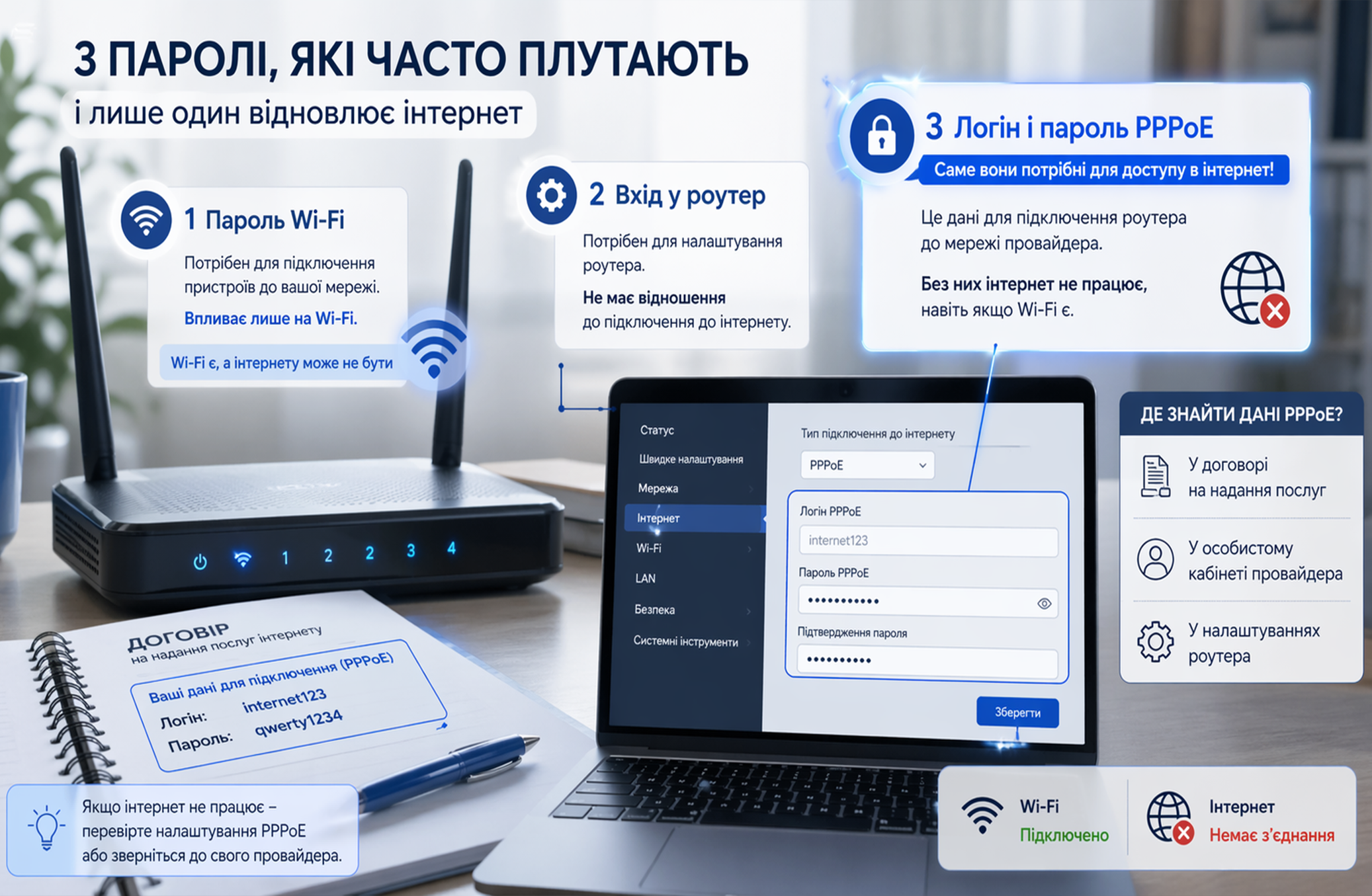
PPPoE (Point-to-Point Protocol over Ethernet), - is a way of connecting to the internet when your router is authorized by the provider using a login and password. Simply put: your router introduces itself to the server to pass the check of whether you have the right to use the network:
- If the login or password is incorrect, the Wi-Fi network will be available, but the internet will not work.
- If the login and password are entered correctly, and the MAC address is registered - the internet will start working immediately.
*The connection type for setup can be found in the Personal Account, in the “Your services” section, or by calling technical support.
How to find out the login and password for internet setup
-
Check the contract
Connection details for the internet are usually specified in your contract with the provider.
-
Check in the Personal Account
Log in to the Personal Account and open the “Settings” section in the “Your services” card. Here you will see the connection type, as well as the PPPoE login and password for internet setup. If needed, you can always change it.
-
Check the router settings
If there is a router that was previously connected, the login and password may be saved in its settings in the WAN or Internet section. If there is no access, this method will not work.
-
Contact the provider
This is also an effective way to quickly get the correct login and password for the internet. After confirming the identity of the contract owner, you will be provided with the necessary data and, if needed, helped to configure the router remotely.
-
Call a technician
If you want the setup to be done for you, you can call a specialist from the BRIZ company.
They configure the equipment, but for security reasons, the authorization data is provided only to the contract owner.
*Current router settings are available at this link.
How to connect and quickly restore the internet
If you are renting a home, sometimes it is easier to reconnect and sign a new contract. Especially if you want internet that works without interruptions, even when there is no power, and provides maximum speed. In that case, you need GPON from BRIZ. The router is configured to a dynamic IP, the internet starts working immediately after connection, and the high speed allows you to use the internet comfortably on all devices. Leave a request and get connected today.
Be the first to comment